
MANILA, PHILIPPINES – A whole new way to design, search and chat with Canva AI – because “make it pop, but subtle yk” is a perfectly valid creative direction.
Once, using technology meant learning how machines talk: code, commands and keyboard shortcuts. Somewhere between social media, algorithms and group chats, that flipped. Online slang now shapes how people communicate not only in their personal lives, but also at work.
Canva is the visual communication tool of choice in the workplace, especially for digitally native teams who grew up using it as students and now bring those skills into the office. Today, Canva introduced Chronically Online mode in English, a new language style inspired by the internet-native generation and the language they’ve adopted.
What it is
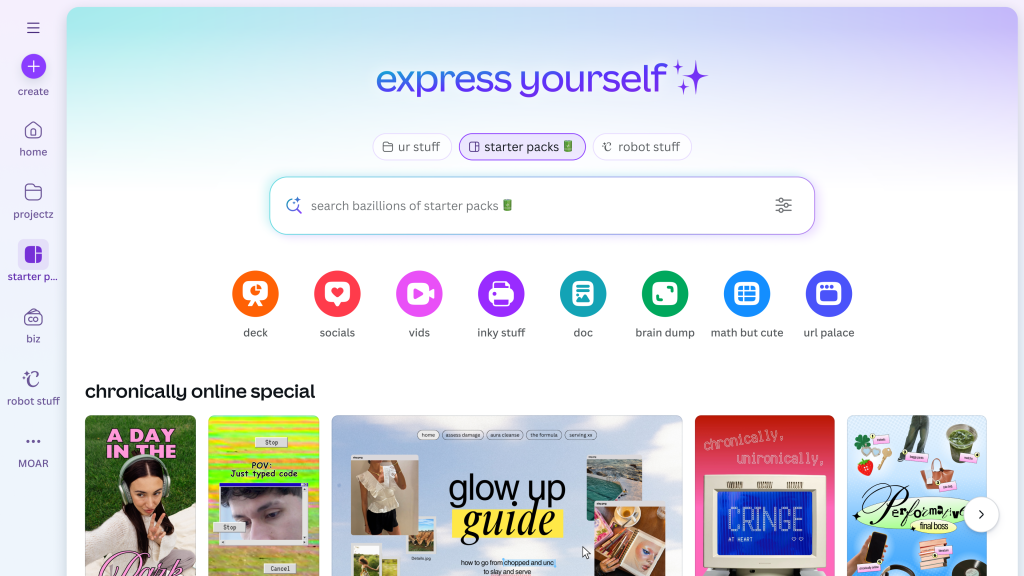
Canva is meeting the moment with a product experience that blends the creative process with online culture. Officially known as English (chronically online), this is a fully functional language setting within the Canva product that transforms every button, tooltip, and AI chat into internet vocabulary.
Users are increasingly prompting Canva AI with phrases like “main character energy,” and Canva is meeting them halfway, recognizing that the way people speak online can be a functional, familiar shortcut that leads to creativity.
In addition to a transformed interface, Canva is introducing a collection of extremely online templates with more easter eggs to discover.
Why now
By 2030, Gen Z will make up nearly 30% of the U.S. workforce, and they’ve embraced Canva as their platform of choice personally and professionally. This gives Canva a direct view of how internet culture is shaping their creative process.
Language shaped by a mix of online subcultures and communities is now influencing not just mainstream culture, but how people communicate and collaborate every day. In the past year alone, terms like “slay” (up 98%), “rizz” (up 88%), and “spill the tea” (up 47%) have increasingly appeared in user searches.
Today, Canva supports its 260 million monthly users in more than 100 languages. Now, that includes Chronically Online mode. To activate it, users can go to Settings in Canva, find the Language section, and select English (chronically online).